Adjustable No-Drill Under-Desk Cable Organizer
Adjustable No-Drill Under-Desk Cable Organizer
BUNDLE & SAVE
Couldn't load pickup availability
-
Ordered
- - -
Order Ready
- - -
Delivered

Adjustable No-Drill Under-Desk Cable Organizer
Hide the Cable Chaos.
Keep the Desk Space.
Move power strips, adapters and loose cables off the floor and out of sight with a clamp-on under-desk organizer that creates dedicated storage right where you need it.

Power Strip on the Floor.
Chargers Everywhere. Cables Hanging in Every Direction.
A good workspace can still feel messy when every device leads to a pile of cords underneath it. Instead of trying to hide the mess behind a desk leg, give your power setup one dedicated place to live.
Less visual clutter • More organized workspace
Turn the Empty Space Under Your Desk Into Storage.
The suspended tray gives power strips, charging bricks and excess cable length a home underneath your work surface, helping free the floor and reduce the jumble around your feet.
Store more without using desktop spaceClamp It On. Tighten It Down. Get Organized.
Two adjustable screw clamps secure the organizer to a suitable desk edge without requiring permanent screw holes in the desktop. That means a cleaner setup with less commitment — especially useful when you want your furniture to stay intact.
No drilling • No permanent holes
Get the Cables Off the Floor and Out of Your Head.
Clear the Floor
Give power strips and excess cable length a raised storage area underneath the desk.
Reduce the Visual Mess
Move bulky adapters and tangled cords away from the most visible parts of your setup.
Keep Connections Together
Store the power strip and related charging hardware in one easier-to-manage location.
Protect Your Desktop
Clamp-on installation avoids the need to drill permanent mounting holes into suitable desks.
Open Enough to See It.
Tidy Enough to Hide It.
The mesh basket keeps devices contained while leaving the contents visible and accessible. Side openings also give cables practical paths in and out of the tray without forcing everything through one small opening.
Easy access • Cleaner routingThe Difference Is Where the Clutter Lives.
Three Steps. No Drill Required.
Position the tray, tighten the clamps and move your cable setup into its new home.
Choose the Position
Find a suitable section of your desk edge with enough clearance underneath for the organizer.
Tighten the Clamps
Place the mounting brackets over the desk edge and tighten both adjustable knobs evenly.
Load & Route
Add your compatible power strip, adapters and cables, then route cords through the side openings as needed.
One Place for the Stuff Your Setup Needs — But Nobody Wants to See.
Create a central under-desk zone for compatible power and cable-management essentials.
Compact Storage for Cleaner Everyday Setups.
The Medium option measures approximately 34 cm / 13.39 in long and 12.7 cm / 5 in deep, giving smaller workspaces a dedicated cable zone without taking up unnecessary room.
34 cm / 13.39 in lengthMore Room for Busier Desk Setups.
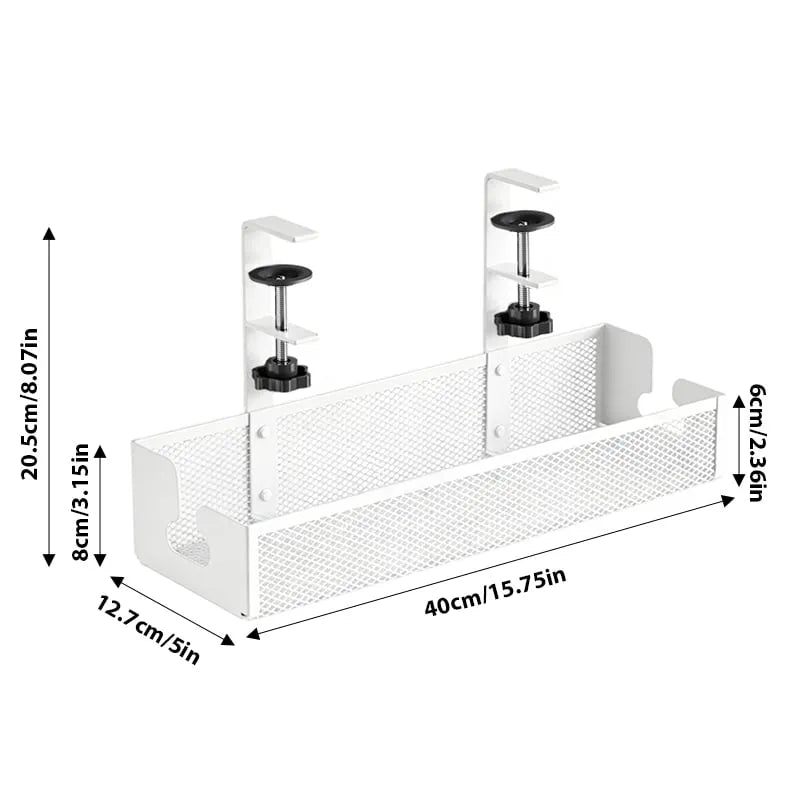
Need space for a longer power strip or more charging hardware? The Large version extends to approximately 40 cm / 15.75 in while keeping the same 12.7 cm / 5 in depth.
40 cm / 15.75 in length
Two Sizes. Two Clean Finishes.
Choose Black for a darker workstation or White for a lighter, more minimal setup — then select the length that works best underneath your desk.


Less Cable Chaos Without Redesigning Your Desk.
Skip Permanent Installation
Clamp mounting lets you add under-desk storage without drilling screw holes into suitable surfaces.
Recover Floor Space
Lift power hardware and loose cable length away from the area underneath your feet.
Keep Cables Accessible
Open mesh construction makes it easier to see, reach and reroute the contents when your setup changes.
Choose the Space You Need
Medium and Large options let you match the tray to a simpler or more equipment-heavy workstation.
Specifications
Check the measurements below before choosing your preferred size and installation position.
| Product Type | Clamp-On Under-Desk Cable Organizer |
| Installation | Adjustable Clamp Mount • No Drilling Required |
| Construction | Open Metal Mesh Basket With Clamp Brackets |
| Medium Length | 34 cm / 13.39 in |
| Large Length | 40 cm / 15.75 in |
| Tray Depth | 12.7 cm / 5 in |
| Basket Height | Approx. 8 cm / 3.15 in |
| Overall Height | Approx. 20.5 cm / 8.07 in Including Mounting Bracket |
| Front Rail Height | Approx. 6 cm / 2.36 in |
| Color Options | Black • White |
| Size Options | Medium • Large |
| Great For | Power Strips • Chargers • Adapters • Excess Cables • Desk Cable Management |
| Package Includes | 1 × Under-Desk Cable Organizer With Clamp Mounting Hardware |
Questions, Answered.
Do I need to drill holes into my desk?
No. The organizer uses adjustable clamp-style brackets designed to attach to a suitable desk edge without permanent drilled mounting holes.
What's the difference between Medium and Large?
Medium measures approximately 34 cm / 13.39 in long, while Large measures approximately 40 cm / 15.75 in long. Both versions are approximately 12.7 cm / 5 in deep.
What can I store inside the tray?
Depending on the size and weight of your equipment, the tray can be used to organize compatible power strips, charging bricks, adapters, loose cables and excess cord length.
Will this fit every desk?
Not necessarily. Desk thickness, edge shape, support frames, drawers and structures underneath the desktop can affect compatibility. Measure the intended mounting area and check for sufficient clamp clearance before ordering.
Does the mesh design help with cable routing?
Yes. The open basket design and side openings provide multiple paths for cables to enter and exit while keeping larger power components contained in the tray.
Which color should I choose?
Black blends naturally with darker gaming and office setups, while White works especially well with lighter desks and minimalist workspaces.
Can I move it to another desk later?
Because the unit uses clamp mounting rather than permanent drilled installation, it can be removed and repositioned on another compatible surface when needed.
Should I place very heavy equipment in the tray?
Avoid overloading the organizer. Always make sure the clamps are fully tightened and the desk surface is suitable before adding equipment. Keep the load balanced across the tray.
It Needs Less
Cable Chaos.
Move the power strip, chargers and loose cords underneath the desk — and finally let your workspace look as organized as you want it to feel.
CHOOSE YOUR SIZE & COLOR ↑